
Bajorat Media
Integrate Google Fonts in WordPress locally & GDPR-compliant
Integrate Google Fonts in WordPress locally & GDPR-compliant. How to recognize Google Fonts and integrate them quickly and easily »
In this article we would like to give you all the important facts about Google Fonts and GDPR and explain what you need to consider. This applies to the ruling from the Munich Regional Court, to options for checking whether Google Fonts are integrated on your own website, to simple ones 1-click solutions to quickly solve the problem of external Google Fonts in WordPress. 15 https://www.youtube.com/watch?v=HCfH1rxob2U
Google Fonts - what is it?
If you are new to the topic of Google Fonts, here is a brief explanation of the problem and what Google Fonts are: Google Fonts are a collection of fonts (so-called fonts) provided free of charge by Google. This collection is very popular and widely used worldwide. As a rule, the fonts are not only made available via Google, but are also integrated into websites and software via Google servers. Although it is also possible to download Google Fonts and integrate them locally (directly and without Google servers), this is often not done. However, there are also good reasons for using Google Fonts via Google Server. On the one hand, the data protection problem with Google Fonts is a very German or European problem. In many other countries you would get a smile if you had to explain that Google Fonts has a data protection problem. Furthermore, integration directly via Google is possible much more quickly and is often solved in many software components via the API there. Technically, it is therefore not that easy to locally integrate dynamic Google Fonts, which can, for example, be changed at any time by a user in a page builder in WordPress. The size of all the font files alone would be gigantic. There are a few other advantages for Google Fonts via Google Server, but we won’t bother with them here because thanks to the GDPR the topic has been settled for us anyway.
The core of the problem
When Google Fonts are accessed via the Google servers, the user’s dynamic IP address is transmitted to Google. However, according to the GDPR, such a transfer must be actively consented to by the user before it takes place.
Who does the problem affect:
Due to the widespread use of Google Fonts, almost every user or website operator who has the opportunity to select different fonts in their theme / WordPress website is affected. As a rule, this function is usually based on the Google Fonts API, which is then used to integrate Google Fonts via the corresponding Google servers. Users of corresponding plugins are also affected, although the name makes this clear, for example: B. Plugins like Easy Google Fonts or WP Google Fonts. We will explain to you a little further down in the article how you can identify Google Fonts on your website.
The Munich Regional Court’s ruling on Google Fonts

However, with the judgment of January 19, 2022, the Munich Regional Court decidedthat passing on the dynamic IP address to Google when using Google Fonts without the explicit consent of the person concerned justifies a claim for damages. A legitimate interest was not sufficient here. The website visitor was awarded €100 plus interest as compensation. Furthermore, the website operator was sentenced to cease and desist. A repeat offense could result in a fine of up to €250,000. Since a decision by the Munich Regional Court, an increasing number of warnings have been sent to website operators who use fonts from Google servers. As described above, the integration of external web content such as Google Fonts from US web services is unlawful without the consent of the visitor. You can find further information about the current warnings here:
- Warnings to website operators with Google fonts (Golem.de)
- Wave of warnings about Google web fonts - How to react correctly; with sample letter (WILDE BEUGER SOLMECKE)
How do I know if my website uses Google Fonts?
The simplest solution for laypeople is a test Google Fonts Checker from Sicher3. There you can simply enter the URL of your website and have the page checked. However, you should urgently note that checking the homepage does not mean that all subpages are free of Google Fonts. If you want to be sure, you would basically have to check every single subpage of your website. As a rule, the homepage and important subpages are already a good indication of whether Google Fonts are available via Google Server or not. What you cannot determine using the tool is the source of the Google Fonts, because this can be different.
Check Google Fonts via developer tools
For experienced users, there are significantly more options for recognizing Google Fonts and their source via the browser’s developer console. The following screenshot and information come from Google Chrome, but the steps can be adapted in a similar form in most browsers. How to access Developer Tools: These are three possible ways to open Developer Tools, so you only need to choose one step and not complete all steps:
- Right-click a page and select Inspect Element.
- Select View > Developer > Developer Tools.
- Use the Alt + Command + I keyboard shortcut.
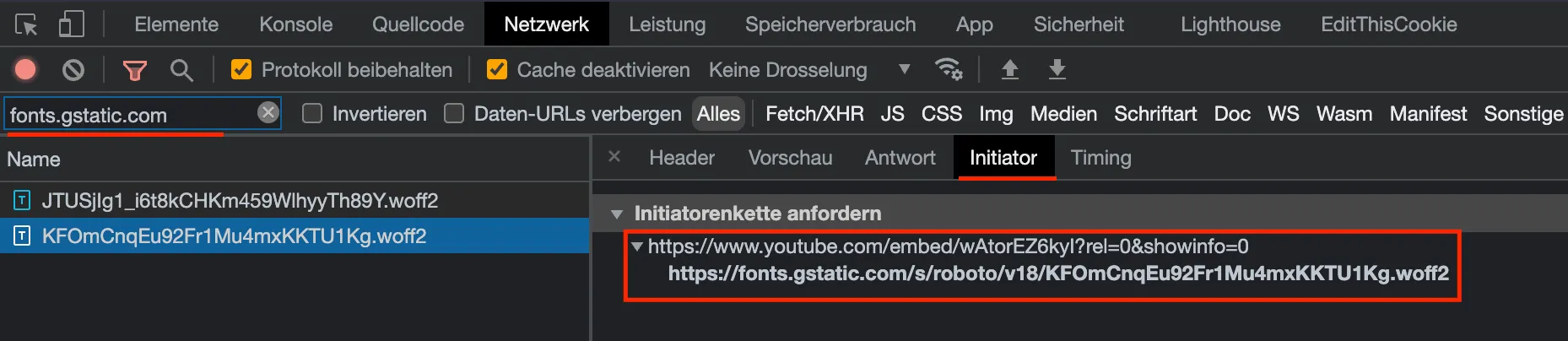
In the developer tools, click on the “Network” tab; you may have to reload the page once for results to be displayed here. Then use the search in the Network tab to determine whether Google Fonts is integrated via Google Server. Search for the following URLs “fonts.googleapis.com” or “fonts.gstatic.com” If either URL appears in the network log, your website uses Google Fonts. 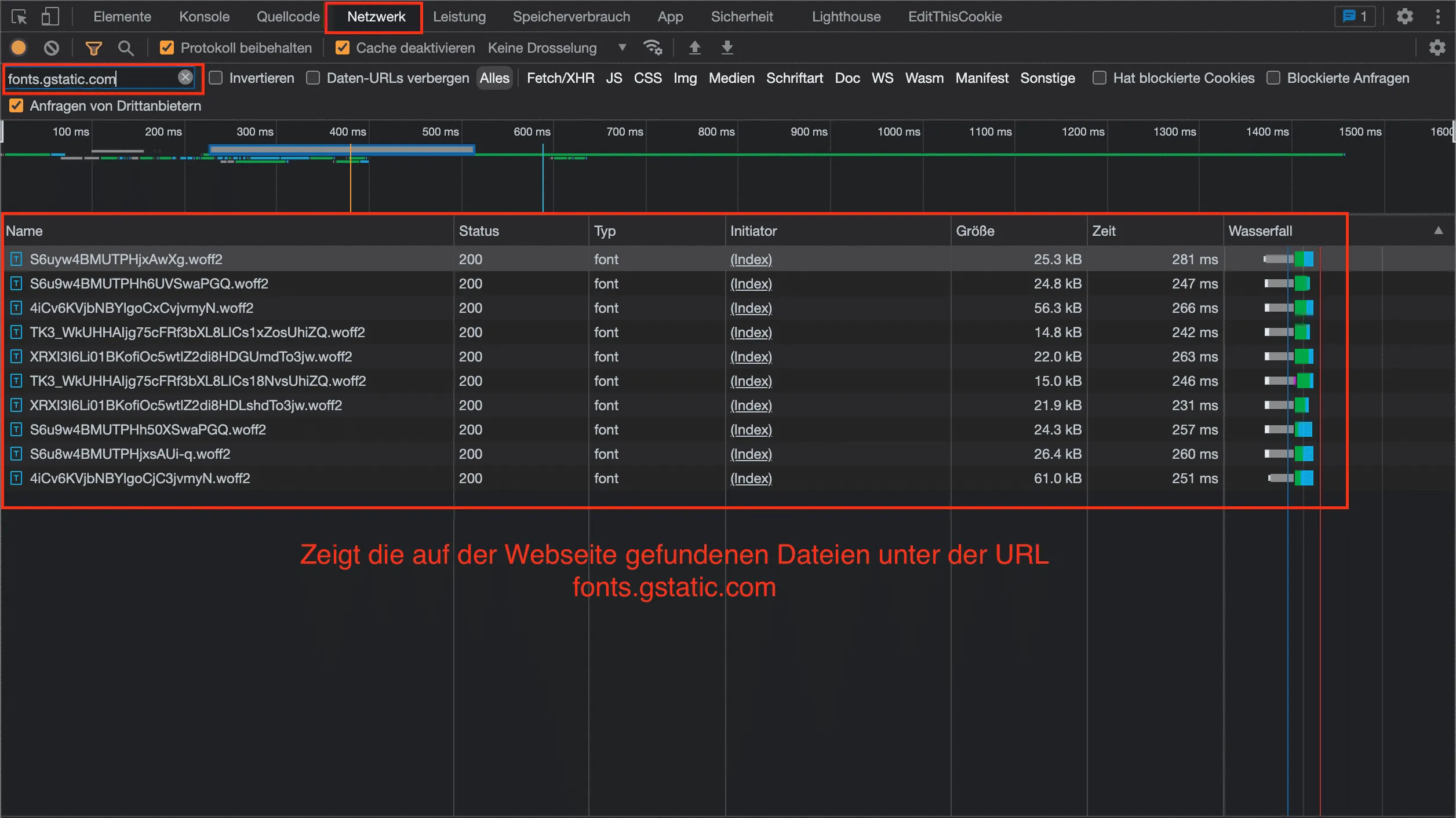
Solutions for local and GDPR-compliant integration of Google Fonts
20The right solution for local and GDPR-compliant integration of Google Fonts can vary somewhat, as it depends heavily on where the fonts come from. If they come, for example, from YouTube, Google Maps or other tools, they are more difficult to avoid because you have no direct influence on these external tools and services. Our plugin offers a solution even for this more complex constellation using a simple content blocker. We now want to deal with the most common form of Google Font integration. The fonts usually come directly from the WordPress themes or a plugin and are therefore integrated directly into your own website. In the following video you will learn how Google Fonts can be recognized and integrated locally with our plugin. This applies to the variant from a YouTube video or Google Maps, as well as the fonts of themes and plugins. https://www.youtube.com/watch?v=HCfH1rxob2U Tip: Are you using the Divi Theme by Elegant Themes? Then take a look at our article “Integrate Divi GDPR & Google Fonts locally | in 10 seconds”. For this area there are two basic ways to integrate Google Fonts locally. An automated and a manual variant:
Automatically integrate Google Fonts locally into WordPress
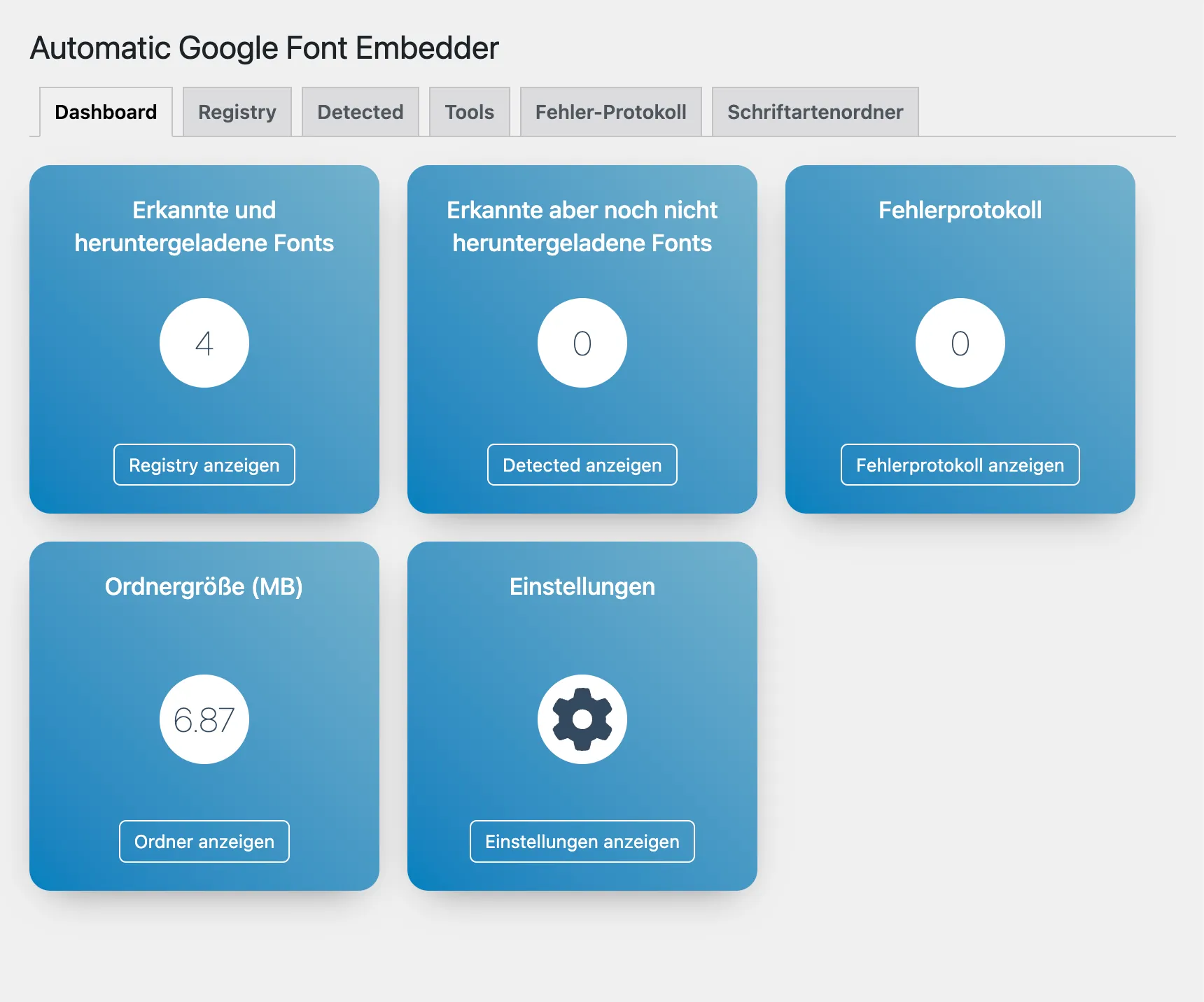
21 Our plugin “Automatic Google Fonts Embedder for WordPress” automatically solves the problem with Google Font integration within a few seconds and without any complex work, which in most WordPress themes and plugins is not integrated locally, but via the Google CDN (Google Server). The non-local integration (i.e. via the Google CDN) of Google Fonts is not in line with the GDPR (GDPR). This “Automatic Google Fonts Embedder” Plugin automatically recognizes the Google Fonts integrated in WordPress, downloads them automatically in the background and integrates the Google Fonts locally. No complex configuration or major manual measures are necessary. The plugin works with the “WP_Dependencies” system and scans the styles registered there on Google Fonts and ensures the corresponding local integration and exchange of the CSS files. The WP_Dependencies are the official and correct way to get CSS files in WordPress and therefore also By standardizing this interface, our plugin works with almost all themes, plugins and page builders, which usually also use this interface for fonts and style files. In its latest version, the plugin also recognizes Google Fonts that are loaded via JavaScript or have been hard-written into the HTML code or customizer. This means that the plugin covers the widest range of sources for Google Fonts and can reliably recognize, automatically download and integrate them locally. The big advantage of manual integration is that our plugin automatically downloads the new fonts if they are changed or if individual subpages use different fonts than the homepage. These changes are quickly overlooked and forgotten during manual integration. This aspect is particularly important for agencies or web designers, because they cannot always control whether a customer/user changes the font in their page builder.
Integrate Google Fonts manually
Please only carry out these steps if you have basic knowledge in this area, otherwise you could cause defects on your website. If your WordPress website already has a child theme, insert the CSS codes and font files mentioned below into your child theme, then you do not need a separate plugin.
Note fonts and styles
The first thing you need to do is make a note of all the Google Fonts and font styles you use so that you know which fonts you need to download.
Remove Google Fonts
To remove Google Fonts from WordPress, you must remove them using wp_dequeue_style() before execution. The ID that you need for the dequeue function can be found in the source code of the respective CSS files. In the source code of a WPBakery website, for example: B. find something like this: <link rel='stylesheet' id='**vc_google_fonts_source_code_pro200300regular500600700900**-css' href="https://fonts.googleapis.com/css?family=Source+Code+Pro%3A200%2C300%2Cregular%2C500%2C600%2C700%2C900" type='text/css' media='all' /> The ID you need for wp_dequeue_style is “vc_google_fonts_source_code_pro200300regular500600700900”, without the “-css” suffix. For an example of how to use the wp_dequeue_style function, see the code example below. You have to do this for every CSS file that Google Fonts loads.
Creating the plugin (skip if child theme exists)
Open the /wp-content/plugins/ folder with an FTP program. Now create a new folder called “google-fonts”. Now create another folder in the newly created folder, which will be named “fonts”. In addition, two files are created, one “google-fonts.php” and “fonts.css”. The structure should then look like this:
- /google fonts
- /fonts/
- /fonts.css
- /google-fonts.php
Open the file “google-fonts.php” and paste the following code there: You can then activate the plugin in your WordPress system under “Plugins > Installed Plugins”. Look for the entry “Local Google Fonts by Bajorat Media.”
Download Google Fonts
Use that Google Webfonts Helper to load the necessary font files and generate the CSS. You now need the list that you created at the beginning. Find each font used individually from the list, click on the required “Charsets” and select the desired and used styles. Now look for the input field for the folder name below the CSS display, this is labeled “Customize folder prefix (optional):”. Enter “fonts/” here to match the structure of the small plugin. 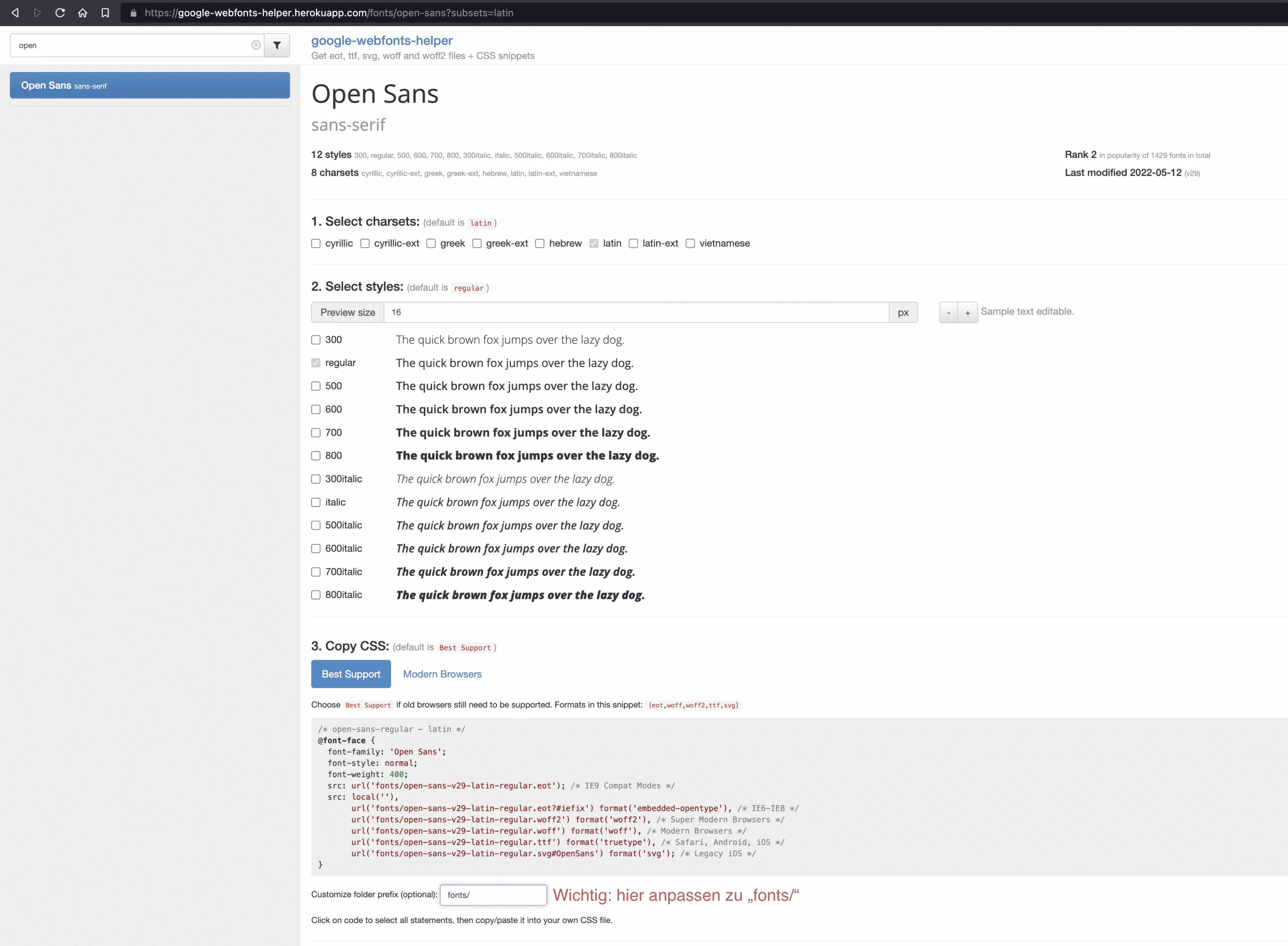
Need help with Google Fonts?
If you still need support when it comes to integrating Google Fonts locally and in a GDPR-compliant manner, please feel free to contact us. We would be happy to help you convert and adapt your WordPress website. Simply contact us. If you would like to find out more about us, visit our Agency profile found it.

