
Bajorat Media
Using UTM Parameters Properly: Structure Campaign Tracking in GA4
How businesses can plan UTM parameters for campaigns, newsletters, social media and ads so GA4 reports stay reliable.
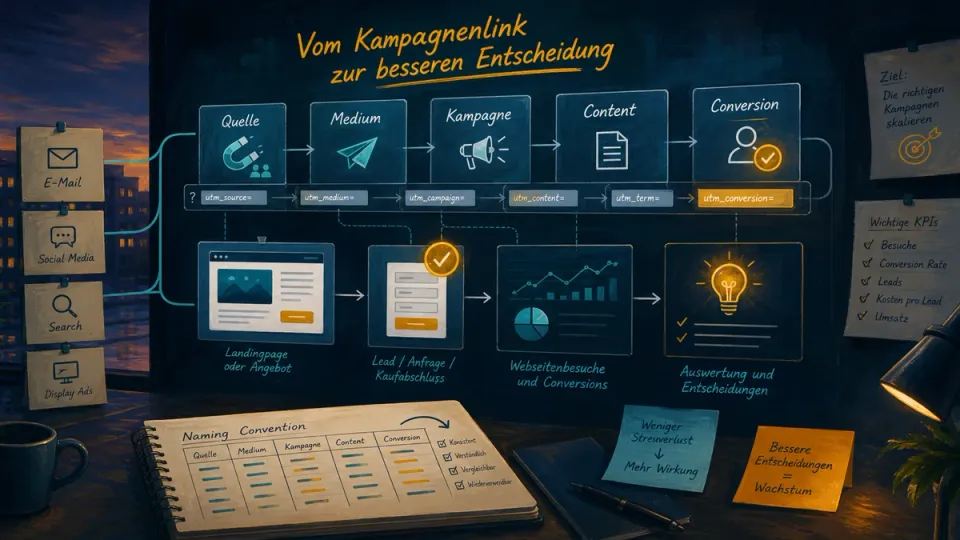
UTM parameters look like a small detail in online marketing. Add a few values to the URL, copy the link, start the campaign. In practice, that detail often determines whether Google Analytics 4 can later show which newsletters, ads, social media posts or partner links brought qualified visits and inquiries.
For businesses, the key question is not whether UTM parameters work technically. Using UTM parameters properly means planning campaign links so marketing, sales and management can read the data reliably. This guide explains how to structure UTM parameters in GA4 without turning reports into a mix of inconsistent names.
Using UTM Parameters Properly: More Than a Tracking Add-On
UTM parameters are URL parameters that pass campaign information to analytics systems. In its documentation on campaigns and traffic sources, Google explains that embedded utm_ parameters are processed into reporting dimensions such as source, medium, campaign and content.
Example:
https://www.example.com/offer/?utm_source=newsletter&utm_medium=email&utm_campaign=spring_2026&utm_content=button_headerThis link says more than “someone visited the offer page”. It adds context: the visit came from the newsletter, the medium was email, the campaign was called spring_2026 and the specific click came from the header button.
That is especially important when several activities point to the same landing page. Without UTM parameters, companies often only see that a page had visitors. With consistent UTM parameters, it becomes visible which channel and campaign contributed to the inquiry. For online marketing, this is the basis for budget decisions, content planning and reporting.
The Five Most Important UTM Parameters
Not every campaign link needs every parameter. Three values should almost always be set: source, medium and campaign. Content and term add detail when several variants need to be distinguished.
| Parameter | Purpose | Example |
|---|---|---|
utm_source |
concrete source or platform | newsletter, linkedin, partnername |
utm_medium |
channel type or traffic type | email, paid_social, cpc, referral |
utm_campaign |
overall campaign | webinar_may_2026, relaunch_offer |
utm_content |
variant within the campaign | button_header, textlink_footer, ad_a |
utm_term |
search term or targeted segment | wordpress_maintenance, b2b_leads |
The first three values answer the core questions: where did the visit come from, which channel was it and which campaign did it belong to? utm_content helps with A/B tests, multiple ad creatives or several links in the same email. utm_term is often used for paid search, but it should not become a catch-all field for unrelated details.
If you are unsure, the official Campaign URL Builder is a useful input form. For teams, a shared internal template is usually better over time because it can include naming rules, examples and approval steps.
Naming Conventions: The Biggest Lever for Readable Reports
The most common cause of poor UTM data is not technology, but language. If one team uses newsletter, another uses Newsletter, a third uses email as the source and a fourth uses mailing as the medium, GA4 creates several rows for what is effectively the same channel.
A good UTM convention should contain a small number of rules that everyone can apply:
- use lowercase values
- use hyphens or underscores instead of spaces
- reserve
utm_sourcefor the platform or concrete source - keep
utm_mediumstable as the channel type - make campaign names clear, but not excessively long
- use
utm_contentconsistently for variants - never write personal data or confidential information into URLs
- do not rename old campaign values in the middle of active reporting
For many companies, a simple pattern is enough:
utm_source=<platform>
utm_medium=<channel_type>
utm_campaign=<topic_month_year>
utm_content=<placement_variant>
Example for a newsletter link:
?utm_source=newsletter&utm_medium=email&utm_campaign=bfsg_check_06_2026&utm_content=cta_introExample for a paid social ad:
?utm_source=linkedin&utm_medium=paid_social&utm_campaign=lead_campaign_q2_2026&utm_content=creative_aThe exact syntax is less important than consistency. Source, medium and campaign need to mean the same thing for everyone involved and remain comparable over several months.

How GA4 Evaluates UTM Data
In GA4, campaign data appears in several dimensions. The most relevant ones are source, medium, campaign name and default channel groups. Google’s documentation on traffic-source dimensions explains how these dimensions support attribution and traffic analysis.
In practice, this means that one UTM value can affect several reports. It may appear in traffic acquisition, explorations, conversion reports and channel groups. That is why controlled naming is worth the effort. A poorly chosen utm_medium can cause traffic to appear as “Unassigned” or in a channel that does not match the campaign.
The default channel group in GA4 follows rule-based definitions. Google also states that the default channel group cannot be edited; custom channel groups are possible, but they do not replace consistent campaign naming.
A typical issue looks like this:
| Intended channel | weak medium | better variant |
|---|---|---|
newsletter |
email |
|
| Paid social | paid |
paid_social |
| Organic social post | linkedin |
social or organic_social |
| Partner link | partnername |
referral |
The source can be linkedin, partnername or newsletter. The medium should describe the channel type. When source and medium are mixed, reports become hard to compare.
Where UTM Parameters Make Sense and Where They Do Not
UTM parameters mainly belong on links that lead from outside to the website. This includes newsletters, social media posts, paid ads, QR codes, partner links, PDFs used externally, sponsorship placements or campaign links in email signatures.
UTM parameters are not useful in the website’s internal navigation. If internal buttons, menu links or teaser cards contain UTM values, external campaign attribution gets mixed with internal user guidance. For internal paths, events, scroll depth, form steps or conversion tracking are the better method.
Google Ads also needs a distinction. If auto-tagging is active, Google Ads passes a click identifier. Additional manual UTM parameters can still be useful when cross-channel reports, CRM attribution or external dashboards depend on them. They should then match the Google Ads structure and avoid contradictory campaign names.
Think About UTM Parameters, Consent and Data Quality Together
UTM parameters do not solve a consent problem. They only describe the campaign context of a URL. Whether and how that context is processed in GA4, Ads, CRM or other systems depends on the tracking setup, Consent Mode, Tag Manager, the CMP and the legally reviewed configuration.
The article on cookie banners, Consent Mode v2 and GA4 explains that layer in more detail. For UTM projects, the practical point is this: a good campaign link only helps if the target page also captures the relevant events in a controlled way. Landing page, form, thank-you page, event concept and consent states need to be tested together.
This is especially true when companies work with Google Tag Gateway, server-side tagging or CRM integrations. A modern measurement path does not automatically improve campaign logic. The parameters still need to be clear, and the reports need to answer the business question.
Practical QA Before Launching a Campaign
UTM links should not be checked for the first time inside the newsletter tool or ad account. A short QA routine shared by marketing and website operations prevents many reporting issues.
Before sending:
- Open the target URL and check whether it loads correctly.
- Review UTM values for spelling, lowercase use and special characters.
- Compare source, medium and campaign against the naming template.
- Test redirects so UTM parameters are not lost.
- Open the link in a private browser window.
- Check GA4 DebugView or Tag Assistant if an important event is expected.
- Trigger a form submission or purchase test where possible.
- Test consent states: rejection, analytics consent and marketing consent.
- Mark test traffic in reports or internal notes.
- Document final links in the campaign plan.
After launch:
- check whether early clicks and sessions look plausible
- compare the campaign name in GA4 and, where relevant, Ads or CRM
- review suspicious variants such as
(not set),Unassignedor duplicate campaign names - compare real leads with form or CRM entries
- feed learnings back into the next naming template
This review is small, but it saves a lot of cleanup work. Once a newsletter has been sent or a campaign has gone live, faulty UTM links can only be corrected to a limited extent.
Common Mistakes With UTM Parameters
Many UTM problems repeat. The most important ones are:
- uppercase and lowercase values are mixed
- source and medium are confused
- campaign names contain internal abbreviations nobody understands three months later
- different teams build links with their own rules
utm_contentbecomes a dumping ground for audience, creative, platform and format- internal website links are tagged with UTM parameters
- redirects remove parameters
- landing pages record visits, but no relevant conversions
- campaign values contain personal or confidential information
- reports are judged by channel groups even though the UTM naming is not suitable for that
The solution is rarely another tool. Most teams need a binding template, clear responsibility and a short check before each campaign launch.
Conclusion: Good UTM Parameters Make Marketing Easier to Decide
UTM parameters are a small technical component with a large impact on campaign management. They connect newsletters, ads, social media, partner links and landing pages with GA4 reports, conversion goals and reporting.
For businesses, a simple standard is worth the effort: a few clear parameters, consistent spelling, tested links and evaluation against real business goals. Then campaigns are not only clickable, but also easier to assess. That is where the value appears: less interpretation work, better budget decisions and a marketing setup that can grow with new campaigns.